

Anatomy of a chart
Let’s break down a short chart, one part at a time. It finds the customer your app means by name, uses it when the name matches exactly, asks your app when the name only looks like one, and adds the customer when there’s nothing like it. The shippedensure does the same for any kind of record, and
also handles a name another list already has.
The run's inputs (from you, or another workflow)
customer.create takes.How it can end
completed and failed always exist. These two tell your app which way it worked.What each state sends
look_up asks the connection’s name index for the name. ask asks your app. create sends the
caller’s own body, with $from.Where each answer leads
if passes wins. Each description is drawn on the canvas. A match always
raises success, so look_up branches on how sure its answer is.One error handler, at the root
What the run returns
The whole chart
find_or_add_customer.json
The whole chart
find_or_add_customer.json
Every key, for reference
Inputs
type, list, example, schema, only, enum, body_of
Inputs
type, list, example, schema, only, enum, body_of
input declares what a run is started with. A run whose input doesn’t match is refused before anything
is sent.States
the nine types, entry and exit
States
the nine types, entry and exit
entry and exit: assignments made when the run enters or leaves it.
upsert counts its looks this way, and add_transaction its sends.Wait states
prompt, details, choose, record
Wait states
prompt, details, choose, record
wait state’s prompt is the question. Your app shows every question the same way, from the
details and choices the run builds when it asks (Answering a question),
so write them for the person who answers.{"$kind_name": "${input.kind}"} is a kind, or an operation’s (invoice.create), as a person reads it:
Customer, Service item, Invoice. The validator checks every key, item outside a choose
included. A template in details or a choose that doesn’t render when the run asks fails the run, as a
bad message does.Request states
requests, settle, on_conflict
Request states
requests, settle, on_conflict
success or error, as QuickBooks answers.Paging
page, success, error
Paging
page, success, error
"paginate": true, a query goes through every result, page_size (1–200, default 100) at a time.more false, so the same chart works over it.A run takes at most 500 transitions, then fails with fault transition_limit. Each handled page costs
about two (to the page’s state and back), so one run gets through about 250 pages: 25,000 records at the
default page_size, 50,000 at 200. For more, raise page_size or split the job over runs, by date range
say (the limits are under Good to know).Notify states
name, data
Notify states
name, data
webhook_url, as a workflow_run.notification, never to a URL of
the chart’s own: url, webhook_url, operation, params, prompt, workflow, input, each
and always are refused. A workflow with a notify state, or calling one with one, can’t start without a
webhook_url (422 webhook_url_required).Match states
kind, name, parent, fields
Match states
kind, name, parent, fields
POST /connections/{connection_id}/matches. Every key is a template, like a request’s params, so
${input.kind} and ${vars.name} work.parent or field, so one chart
serves records with and without them. Literal values are checked by the endpoint’s own rules when the
chart is saved: a kind from the list, a parent only for the kinds that have one, fields only for the
kinds whose lists hold them, and a min_score from 0.3 to 1.0 that isn’t sent with exact_only. Keys of
other state types (operation, params, prompt, data, always, paginate, settle and the rest)
are refused.response.data is the answer the endpoint gives. match is exact,
strong, candidates or none. record is set for exact and strong. candidates holds up to 10,
with candidates_total and candidates_total_complete, and index has its state and as_of.A match step has no QuickBooks status codes to branch on. Branch on response.data.match.match state
starts the build as the run starts, so it overlaps the steps before it, and the run waits while the
index builds.Without an index, it falls back and is never refused. On a connection downgraded to standard
while the run is going, or if the index’s build gives up, the step sends QuickBooks’ own filters instead, as ordinary requests of the run,
settled like any other: the exact full name, and the “contains” name filter, for each list the kind
covers. The answer has the same shape, with index.state unavailable: exact, or candidates
without scores (score is null, the reason is contains the name), or none, and never strong.
exact_only skips the “contains” query, and min_score and fields have nothing to apply to, so they
are ignored. So the run finishes, without the index’s ranking, punctuation, suffixes, word order,
typos and other fields.exact without asking. Acme Inc and Acme LLC are a strong match for each other, and
they can be two companies. Send strong and candidates to a wait state that asks your app. When
candidates_total is more than the 10 that came back, ask for a detail that tells them apart (a
number, city, postal code or account number) and match again, rather than show a long list.match_waiting, then match_answered). The run’s page says
“building the name index” or “refreshing the name index” while it waits, then shows the tier and the
candidates with their reasons. The run’s summary.matches lists each match step with its state, tier,
counts and the index’s state, and is there only when the run matched.Wait states
prompt and its options
Wait states
prompt and its options
on must handle every option id, and no other. An option can’t be called success,
error, done or always.Transitions and conditions
if, target, assign
Transitions and conditions
if, target, assign
if passes wins.success, error, done and always are reserved event names. State keys, option ids and
variable names are lower case: a letter, then letters, digits and underscores, up to 50 characters (a
workflow’s own key may run to 64).Templates
${…} and the six $ keys
Templates
${…} and the six $ keys
${...}:$ keys build values, and no others are allowed:Outcomes
kind, output
Outcomes
kind, output
completed and failed always exist. Declare more under outcomes: your app branches on the run’s
outcome, so name every ending it should treat differently. No state may use an outcome’s key.success and a failure as error, both with
response.outcome naming it.Descriptions
on states, outcomes and branches
Descriptions
on states, outcomes and branches
description. It’s drawn on the canvas and shown
in the usage contract, and it’s where the chart explains itself: “a customer has that name” rather than
“success”./api/v2/workflows/schema.json, and in the
authoring guide your assistant reads (Write one with an AI assistant).Build it in the dashboard
On the Workflows page, New workflow starts a blank chart, clones a shipped template, or takes JSON you already have (Import a chart). Each opens the builder: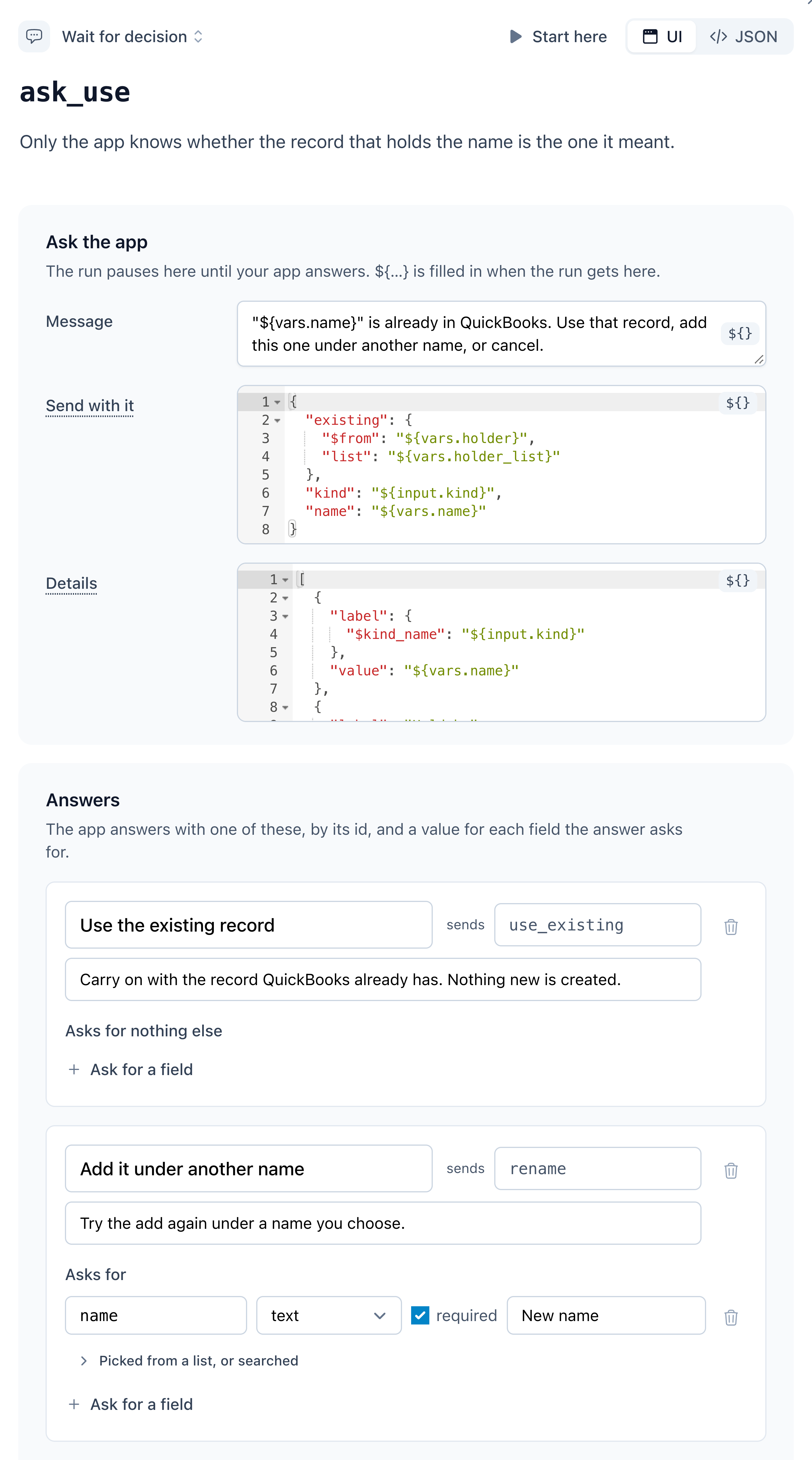
A wait step: the message, what it sends with it, the details rows your app shows, and each answer with the option id it sends.
Write one with an AI assistant
Charts are built to be written by an assistant and reviewed by a person. Describe the job in prose: what should happen, and what should happen when QuickBooks says no. The assistant writes the JSON, and its reasoning ends up in thedescription fields, where the next person will read it.
Give it the rules
Let it check its work
validate_workflow_chart tool, or:It always answers 200, with valid and every error, each with the path to the problem. Once the
chart is valid, warnings lists what’s allowed but probably wrong. Send the workflow’s key too, and it
checks the workflows the chart calls:Save it
PUT creates or replaces by key, so charts can live in your repository and be pushed from a deploy
script. Add "publish": true to publish in the same call. The CLI does the same with
qube workflows push ./chart.json, taking the key from the chart’s own key.Hand the other side to your assistant too
GET /api/v2/workflows/{key}/usage.md describes how to call the workflow, generated from the chart
itself. Give it to whatever writes your app’s side. A shipped template’s is
GET /api/v2/workflow-templates/{key}/usage.md, readable before you install it.It covers how to start the workflow, every question it can ask (with example webhooks and answers), every
outcome and what’s in its output. It describes the published version (the working copy, until there is
one); add ?version=working, or a version number, for another.In the builder it’s the Use from your app tab: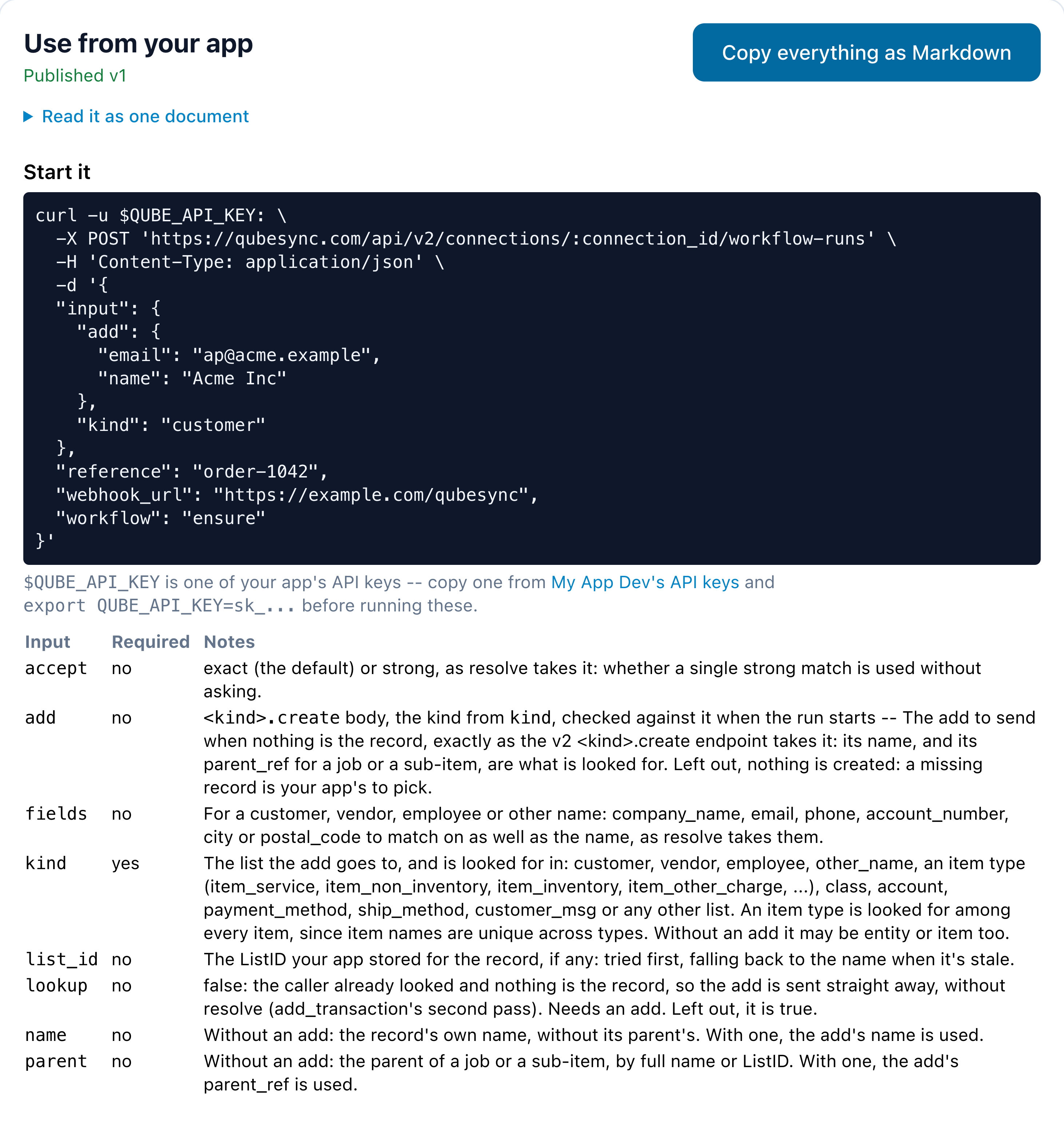
Use from your app: the usage contract for ensure, ready to copy as Markdown.
Test it
Run it against a simulated connection from the builder’s Test run panel or the API. The panel docks beside the chart, so the chart shows the run’s path as it goes. On a sandbox app it can run the working copy, the published version or an older one.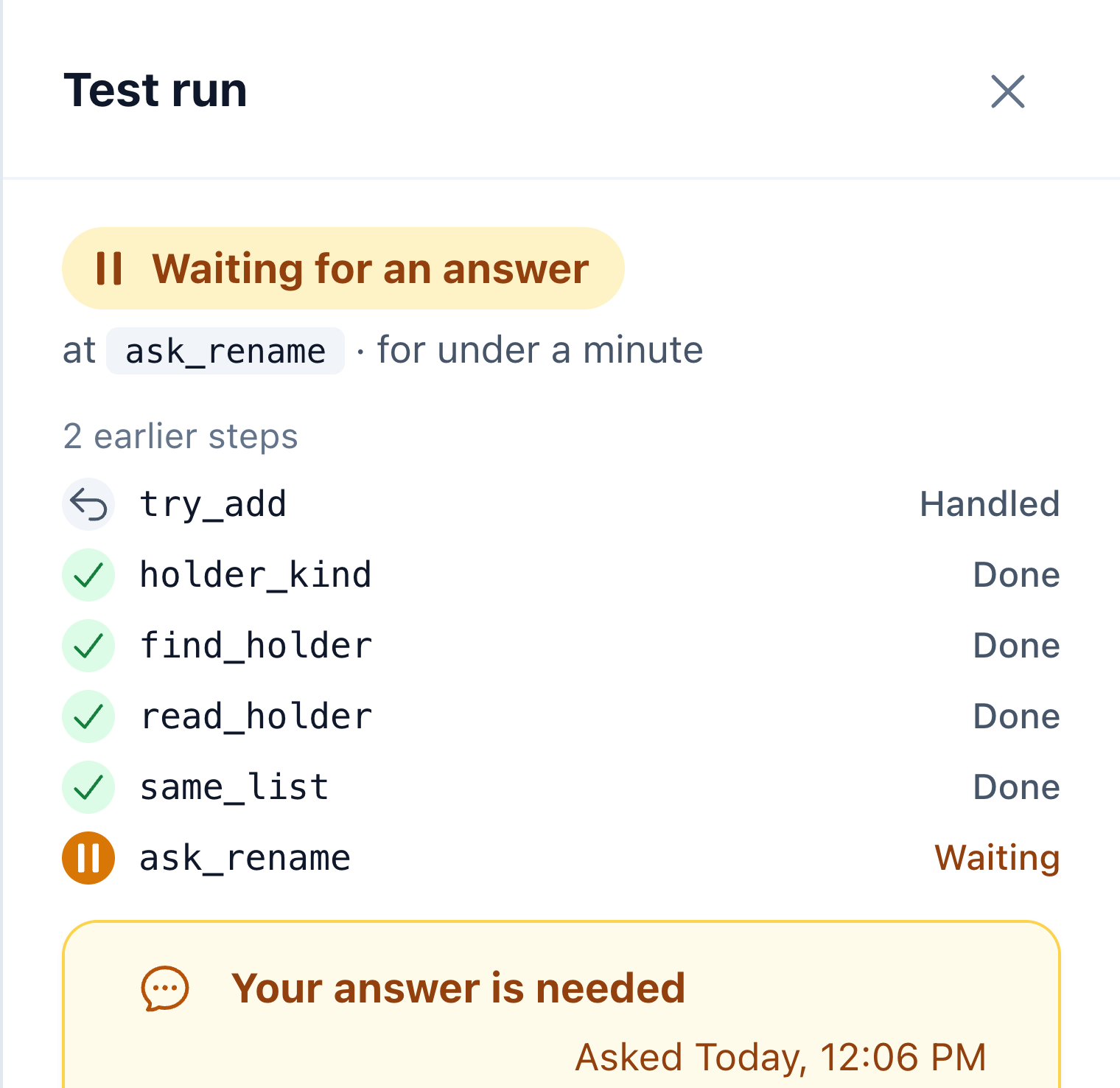
Test run, beside the chart: the run's status, its steps (an error the chart handles is Handled), and its question.
edit_sequence there’s
no baseline, so as_read is null and every field that differs counts as a conflict.Versions and publishing
A workflow has a working copy, which is what you edit, and numbered published versions, which are immutable snapshots.workflow_id: null.From sandbox to production
Build and publish in your sandbox app. Then promote the published version to your production app: In Versions, Promote to another app… copies the published version into another app under the same key, and records where each version came from. It brings along the workflows it calls, showing each one as created, updated or skipped in the target, with what will change. Publish there as well is ticked by default. Untick it to land the chart as that app’s working copy for a final look.Composing workflows
Aworkflow state can run another workflow (under the same app) as one step.
Prefer combining workflows to just copying another chart’s states. For example, add_transaction runs two
other workflows, each once per reference its add makes:
each, the state runs the workflow once per element of a list: one at a time, in
order, at most 200.
success with the outputs in response.data, how each ended in response.outcomes, and
failures in response.errors. When a stop_on ending ended the loop, response.data and response.outcomes
stop at that element, and response.stopped says which and how: {"index": 0, "outcome": "cancelled"}.
Branch on it to your own ending, as add_transaction does when your app cancels at one of its references:
{"if": {"path": "response.stopped", "op": "present"}, "target": "cancelled"}.
workflow state takes no always, params, operation or prompt.One chart for any record type
find_or_add_customer names its operations, so it only ever finds and adds customers. A chart can take its
operations as input instead: declare an operation input without an operation, and it takes a pair, an
operation and its params. A request state sends the pair with a templated operation and $from, as
stream_query does:
ensure builds its operation that way: it takes a kind and the add to send, and sends "${input.kind}.create",
so {"kind": "vendor", "add": {"name": "Lone Star Supply Co"}} adds a vendor.
Start from the shipped generic charts rather than writing the states again:
workflow state. push_records is one: it runs upsert
once per record your app sends, each record the kind, add and update that upsert takes, records of
different lists mixed:
upsert does
handle one race. When its add meets 3100 because something created the name after the lookup, it runs
resolve once more, counting its looks with $add in the state’s entry. When the second look finds
nothing too, another list holds the name, and it runs ensure with lookup: false for ensure’s question.Sending your app data from a chart
Anotify state hands your app data while the run goes, not only at the end
(what your app receives). The usual use is a whole list, a page at a
time. This is stream_query’s loop:
data, response is the response that brought the run to the state (on a paginating query’s page,
that page), so ${response.data} is the page’s records.
wait that asks whether to retry, say. Unhandled, the run fails.
Matching names in a chart
Your app knows a customer asACME, Inc.. QuickBooks finds Acme Inc only by that exact spelling. A match
state asks the connection’s name index instead, which ranks the file’s names against yours, and
the chart branches on how sure the answer is.
This is look_up, the first state of a chart that finds a customer by name:
exact and none tiers go first, then the crowded answer, and
what is left goes to a wait state that asks your app.
email is left out when the run was started without one, and city and postal_code until your app has
sent them: a key that renders to nothing is dropped, so one chart serves records with and without them.
The whole chart
find_customer.json
The whole chart
find_customer.json
Settling lost answers
When QuickBooks never answers a request a run sent, the run settles it before the state raises anything: it finds out whether QuickBooks applied it (Lost answers).external_guid, when the operation has one: yours if you set it,
otherwise one the run generates. That’s nearly every transaction, plus customers, vendors, employees, other
names and items. QuickBooks stores it on the record, which is how the run tells its own invoice from another
one for the same customer on the same day.What the state raises
What the answer would have raised, usuallysuccess, with two more fields:
error with code null:
The two errors, exactly
The two errors, exactly
unsettled message is always QuickBooks never answered <operation>, and <why>. A no_response
message starts QuickBooks never answered: and says why: the session ended, the request was withdrawn
before it was sent, the Web Connector reported a failure in place of the answer, or the request ended in
some other state. reason says the same as a word to branch on, and an add’s external_guid is the GUID
it was sent with:Where settling shows up
Where settling shows up
no_response straight away: one your app withdrew, one
QuickBooks couldn’t parse (xml_error), a paginated query, an operation with nothing to look for
afterwards (such as a void or a merge), and any request state with "settle": false.Doing the looking in the chart
"settle": false hands a lost answer to the chart at once, as no_response, with response.error.reason
saying why and, for an add, response.error.external_guid, the GUID it was sent with. That makes the looking
part of the chart, where the diagram and the run’s log show it.
No shipped template does it any more: add_transaction leaves its add to settling, and asks your app at
ask_about_add about an unsettled add or a no_response that reached QuickBooks, with why in the
question’s data saying which, and candidates_complete whether the candidates are all there could be.
A chart that looks for itself:
external_guid you send
yourself should be written that way too.How the run's summary counts what the chart found
How the run's summary counts what the chart found
summary.requests reads as one the run settled itself: "status": "success", "settled": "found", the
record’s identifiers, and found_by, the state whose answer carried it. It’s in summary.side_effects,
and the run’s page lists it under Changed in QuickBooks:"status": "error", gets "unconfirmed": true, and is listed under summary.unconfirmed
instead: your app picked another invoice, say, or the run failed or was cancelled first. It may or may not
be in QuickBooks, so look before sending it again.Conflicts in a chart
When an update meets a record someone changed after it was read, the run compares fields before anything is overwritten (Conflicts). It compares each field the update sends with the record as it is now (QuickBooks answers the 3200 with it; when an answer doesn’t, the run reads it again) and, when the run read the record itself, with the record as it was then.error 3120 (object_not_found), such as “nothing to update: no
item_non_inventory has this id; the record was deleted, or it is another type of record”. The read goes by the
update’s own type, so an inventory item’s list_id sent to item_non_inventory.update finds nothing too:
update a record with the operation for its type.